
Process Organization
TIP
A goal without a plan is just a wish.
– Antoine de Saint-Exupéry, French writer, poet, journalist and aviator.
This chapter will delve into planning your work, organizing your day, and enhancing the execution of your tasks.
As most of us did at some point, when you start reading this part of the book, you are very likely thinking:
“I don’t even have enough things to do to need an organization; my days are very similar, and if I need to remember something, I have my memory for that.”
We saw in the foundations what happens with memory. But the critical point is, do you want to fill your memory with things you could write on paper or keep on your computer? Do you value your mental resources so little?
The question here is not whether you can do it, but about improving your day.
A Gold Mine
When we are born, we all have a gold mine for us. This mine is full of the most precious thing we will ever have.
Imagine starting a new company with around 30,000 gold ingots to finance it. The only condition is to pay with one of those nuggets daily.
Initially, you won’t mind spending each of those nuggets; you have many. The value of anything is always relative to the amount you have.
As time passes, your treasure is getting smaller and smaller, and the bad news is that you can’t acquire more of this striking gold.
You can face this situation in two ways: spend your birth gift until there is no more, without considering the value increase due to the shortage. The other option is to start valuing this precious metal as soon as possible and decide where to invest it so that you can maximize its return.
This unique gold, in reality, is the time you will have in your life. You can’t buy time, but you can decide how you spend it.
The first thing you can do is learn how to get as much as possible from each day. It usually doesn’t mean spending all your time working; it just means investing that time to get what you need.
Do you imagine a risk investor making investments without any preparation or investigation into the potential risks associated with each investment?
Long working hours are not a guarantee of a profitable return. In my professional life, I learned something that completely changed my perception of how I should invest my time.
TIP
Make a clear separation between your professional and personal lives.
As a young developer, I was eager to demonstrate my value and knowledge of programming, just like most of you. I used to spend long hours working, far beyond office hours. My work was my passion.
That lasted for ten years.
One day, I went to work, and I started feeling sick. It was not like the flu or any other similar illness. Now I can say I had the feeling I was going to die. I could hardly breathe, and my eyes couldn’t fix on any object. It was like looking inside a long, endless tunnel. I went immediately to the doctor. There was no pain, but I was terrified about what was happening to me.
It was an anxiety crisis caused by high stress. It’s commonly referred to as burnout syndrome.
The reason for that was probably the high pressure we had in the project I was working on, or the team’s low management level. However, in reality, the reason was that I wasn’t managing my time and effort effectively.
I had three months of sick leave to think about what happened. And the conclusion was that it is never about the amount of time but the quality of the time.
From that experience, I adopted two rules that I follow strictly. I never work outside of work hours, and when I’m stuck on a problem, the best I can do is change to another task or go for a walk. A high-level professional does not provide value for the time spent in front of a computer. The value we offer is finding solutions to problems. You won’t be able to find any solution with a tired brain.

TIP
If we fail to prepare, we prepare to fail.
– James H. Hope, State Superintendent of Education for South Carolina.
I remember my first working day. It was a small family business that provided an invoicing app for companies. I sat at my workplace, took out my notebook, and started drawing a flow diagram to agree with the analyst on how to approach my first task.
When the analyst saw me drawing, he asked, “What are you doing?” - and I answered, “Creating a class diagram and a flow chart.” He seemed puzzled.
“We are not here to draw but to develop,” He said.
This attitude is what I refer to as factory thinking. It just matters how much time you produce, even if you’re unsure if you’re building the expected thing.
Many years later, I encountered similar behavior in another client. If you are not typing in the office, you are not working.
You must have arguments to explain why it is essential to have a clear direction and proper preparation.
Would you rely on an architect who starts giving directions to the builder as they build without a blueprint?
Would you feel comfortable accepting medical treatment from a doctor who did not investigate what happened to you?
Of course not.
However, for some reason, we accept building applications with minimal to no preparation in our engineering department.
TIP
Spend time in preparation, and your time will have double value.
The last lesson I learned is about having a clear direction.
If you don’t know where you’re going, how can you check if you’re getting closer to your goal?
TIP
If a man knows not to which port he sails, no wind is favorable.
Going back to the investment example, any investor needs to ensure that the company they have invested in is doing the right thing. That means she needs to set a starting point, an endpoint, and a path connecting them. She must get the company closer to the endpoint in every decision. Sounds obvious. You would be surprised at how many professionals overlook it.
The same happens to you. When you get involved in a project, setting a clear goal and a plan to get there is mandatory. Any step, task, or idea should bring you closer to the target. Otherwise, you are wasting your gold.
TIP
Collect all the information you need before investing your time.

Before You Start Organizing Your Time
When everything is necessary, nothing is. We receive tons of notifications every day. Most of us enable any app that wants to send us a notification, and we get notified even for things we are not interested in.
Warren Buffett once said – “The poor invest their time, while the rich invest their money” –. This sentence means that time is the most precious thing you have and the only thing that money can’t buy right now.
I don’t want you, by any means, to run away from technology, not at all. What I suggest is that you make proper use of it.
One of the first lessons to learn when you want to increase your productivity is to draw and maintain a clear line that separates your personal life from your professional life.
In the same way, you don’t like to be bothered by any workmate when you are on vacation, on the weekend, or after work at home with your family or friends; you should have the same feeling when you are at work. And believe me, nothing is so crucial that it can’t wait for you to take a break or finish your workday. If that’s the case, there are better ways to contact you than through notifications.
Exercise 3.1: Review your active notifications.
We are often not aware of how many apps are sending us notifications. The best way to learn it is to list active notifications from apps and review whether we need them; then, activate or deactivate based on real needs.
Draw a table with three columns, or use any spreadsheet. Open all the devices you use daily and check which notifications are active.
For each notification, annotate the device you have enabled in the first column: cellphone, computer, laptop, watch, etc. In the second column, write the name of the app that sends the notifications and leave the third column empty.
Once finished, look at how many things are interrupting your daily work.
If you are like the average techie, you will find around one hundred apps activated per device. That is a lot, and it is.
Do you need to be notified that someone sent a new message to that chat group? Is it necessary to receive a notification right now saying that your favorite podcast has a new episode?
The vast majority of those notifications are unnecessary. Messaging apps aren’t, but so are mail and social networks.
The real utility of those apps is that you can receive the message and then process it at the right moment for you; you don’t need to answer immediately; we often forget that this is their original purpose. Remember that there are other ways to draw your attention in case of an emergency, such as making a call.
To finish this exercise, evaluate which should remain enabled and annotate yes or no in the third column.
Once finished, keep only those apps with a ‘yes’ in the third column on your devices.
Different Organization Systems
I’ve been testing various organizational methodologies to improve my productivity and reduce stress and anxiety by staying focused on my tasks.
After trying and testing them, I’ve only been able to work with two of them fine. Both are great, but for very different reasons.
The first one I tested was the GTD© method, as described by David Allen. It is fantastic and works exceptionally well. I’ve been using GTD for years, and it has dramatically improved my productivity. However, when I started introducing it to development teams, it was very challenging for people to transition from zero to GTD. Another difficulty is that it is not flexible. If you don’t follow the principles of GTD, as described in the book, you are not practicing GTD.
For years, I’ve been seeking a more straightforward and flexible solution to boost productivity and serve as a training platform for transitioning to GTD in the future.
In 2014, I finally found a great platform. Bullet Journal©1 by Ryder Carroll 2. It has everything I wanted to introduce, such as a productivity improvement system, yet it did not conflict with GTD.
For more information and sources on both methodologies, please follow the provided links. I will present a flavor of Bullet Journal with some additions that make it perfect for development teams and, in general, for IT professionals, and prepare the path to do GTD.
I strongly recommend reading both books to gain detailed information about the methods and a comprehensive history of how their authors developed the technique.
Why analog
There are many excellent applications to manage your daily tasks based on the GTD workflow, but most of them provide their version.
Some of the best apps I’ve tried are:
Things3 It is a fantastic app by Cultured Code for the macOS ecosystem, providing desktop, iOS, and iPadOS apps.
Omnifocus4 Reference in software for personal organization. They pioneered in the sector and offer top-notch applications for macOS, iOS, and iPadOS.
2DO5 It’s probably one of my favorites. It works amazingly well from scratch if you want to follow the GTD method. It also offers apps for all Apple ecosystems, as well as a fantastic Android App.
Facile Things6 Facile things follow a different approach from the previous ones. Facile Things is a web app that allows you to follow the GTD workflow completely. It is accessible from all platforms as it only provides a web interface.
They are all great tools; you can choose the one that best fits your preferences. However, they are not a good starting point. What makes a tool great is its consistency in use. If you are starting from zero, this will be hard to do. My experience is that, as with all new habits, the key is to start with a simple procedure and gradually add complexity to it as you become accustomed to it. Analog tools help you adopt a new technique and make the process yours in a shorter time.
Another fundamental reason to use a notebook and a pen initially is that apps on your phone can be a significant source of distraction and disruption. As we mentioned earlier, it is best to avoid distractions. I must admit that they work fantastically like Inboxes, but that’s all I would use them for at the beginning of the habit acquisition. Bullet Journal meets all these requirements. Although it is not a GTD version or anything like that, it is a fantastic starting point. As you become more familiar with the process, you can begin to add complexity to the method.
Start your journal
Exercise 3.2: Prepare your journal
In this exercise, you will set up your journal for the organization.
The first aspect to consider is the kind of notebook you need. My recommendation is that you choose one with the following characteristics:
- A5 or similar size. It should be easy to carry anywhere, so avoid using a large notebook that adds too much bulk or weight.
- Heavyweight paper. You will write a lot in that notebook and don’t want to see how the ink traverses the paper.
- Dotted paper. Keeping a friendly and aligned text with a dotted line on paper is more accessible. Also, it helps when drawing schemes.
- Two or more bookmarks. Bookmarks allow you to access the most recent entry in the journal.
My recommendation is Leuchtturm1917, which is available in both soft and hardcover options. I’ve never been disappointed by one of those notebooks.
There is already a pre-formatted Leuchtturm bullet journal version. You can buy that one or follow the steps here with any regular notebook.
Step One: Prepare your Index
This will contain the table of contents of your journal, and build it as you use it.
Add your index, open the first four pages, and write the word INDEX centered on the top page. I filled three pages in a single journal very few times, but we can keep four just in case.
It would be helpful if you numbered your pages from now on to maintain consistency in the index. Some people start page numbering at page one after the index, and some include the index in the page numbering; that is up to you. If your notebook has numbered pages, skip this step.
Step Two: Identify your InBoxes
Select all the sources containing pending tasks.
To collect tasks, the first thing you need to clarify is where to collect them from; this will include any source of tasks you might be keeping right now, even if you are not fully aware.
Typical places where you might find pending tasks are:
- Mail Inbox
- Slack (or any instant messaging app you are using personally or professionally)
- To-do list apps
- Paper sheets
- Notebooks
- Scrum or Kanban board
I forget many sources, but that doesn’t matter; you can process them later if needed. We call to process the inbox and review the content to determine the next steps.
Step Three: Process your InBoxes
Decide one by one what you will do with your pending tasks.
We, as Engineers, love defined processes. The easiest way to process an inbox is by using a workflow. Refer to the workflow described in the image, and I will guide you through a few examples to complete the flow and the journal.
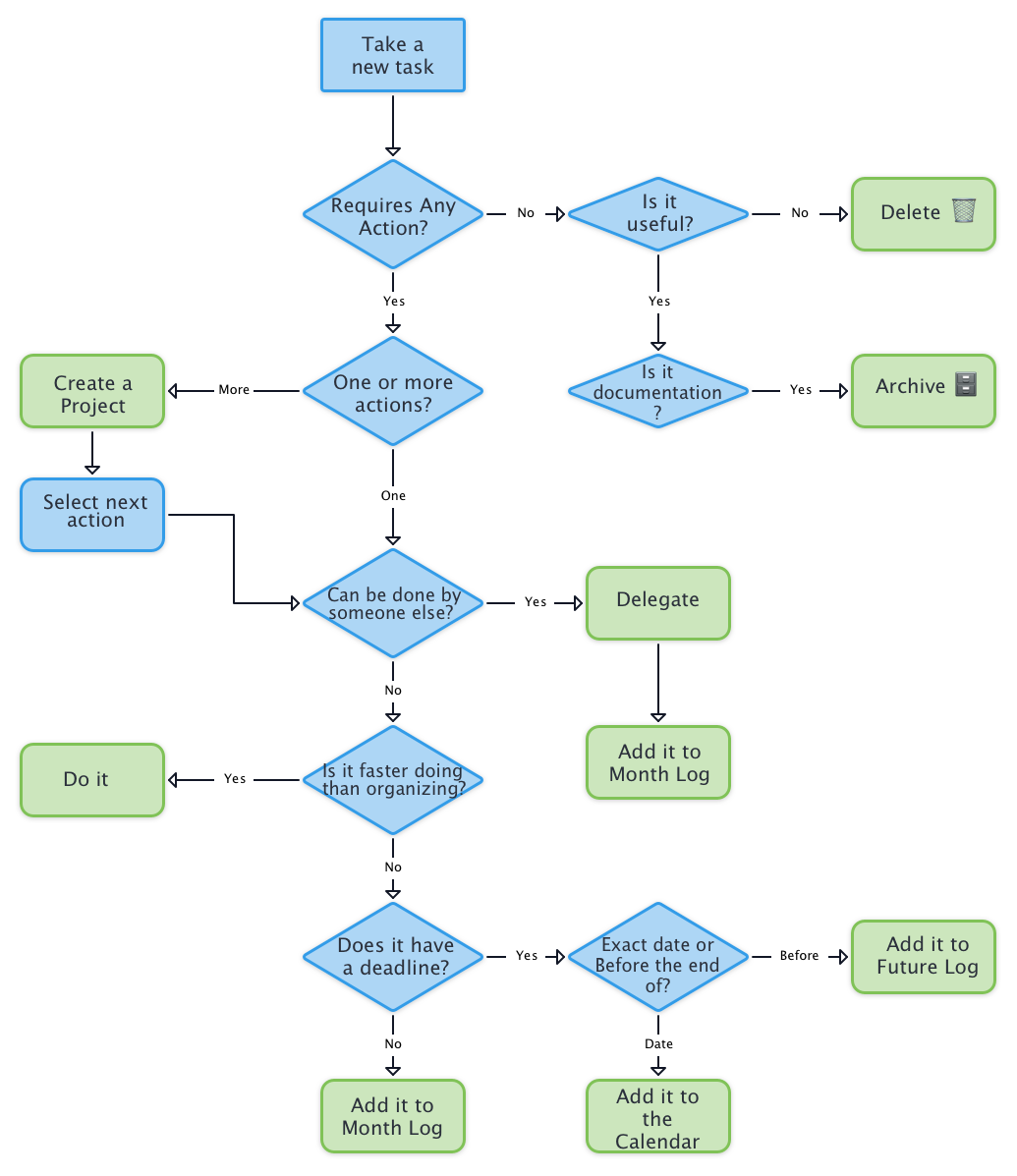
As we all have an email inbox, I will use it to walk you through the rest of the process. Note that you can repeat this process with all your inboxes.
The goal here is to end with an Inbox Zero, also with email.
Take your first email. For example, I will assume it’s an email from a fantastic new gadget on Kickstarter, offering you the latest thing that’s on sale.
Starting the flow, we need to ask ourselves, This Requires Any Action? The answer is no, so we move on to the next question.
Is it useful? The answer here is, again, No. We then proceed to the action Delete.
Easy.
Let’s find out another email.
This time, we have a new email about the latest updates on a framework we usually use. Again, we ask the same questions.
Requires Any Action? The answer is No, so we move to the next question.
Is it useful? In this case, the answer is Yes, so we need to archive this email for future reference. Here, we find our first container.
Containers are the locations where we store all the outputs from the inbox process. The first container we need to create is the “Archive.”
The Archive will contain all the necessary material for further checks or as documentation. It can be a single folder where we store a copy of any document or a more elaborate documentation system. I use three archive containers.
- Dropbox - A documentation folder containing a set of folders by topic, where I store all PDF, EPUB, and other reading documents I need for documentation.
- Bookmarks - A folder in my web browser where I organize and store all the websites I want to keep for documentation.
- Email - A folder in my email App lets me maintain the same organization, but it contains emails.
I use this setup, but I encourage you to find and use the best combination for you. The goal is to store documentation and access it quickly.
If you feel it is necessary to create a reminder to review the documentation you just added to the container at a later time, you should make a new task in one of your inboxes to process it later. This task should read something like, “Read the documentation about new features of framework X.”
Back to processing, we have an email from the new member of your team asking you how she should proceed to gain access to the company’s instant messaging system.
Starting our flow from the beginning, you ask the questions.
Requires Any Action? The answer is Yes, so we move to the next question.
One or more actions? In this case, the answer is One: we must request access to the system’s administrator.
Can someone else do it? In this case, the answer is Yes; You are not authorized to perform that action.
First, you need to perform two actions: delegate the task to the right person, in this case, the system’s administrator. Second, once you request access for your teammate and don’t want to leave things unfinished, you will add a new task as a reminder to check that everything is complete.
This moment is the right time to create the first two collections in your journal. In the bullet journal, all the grouped tasks are named collections.
Open the following four pages after the index in your journal and name them FUTURE LOG in each page’s top center. Don’t forget to add page numbers if you haven’t already done so.
Now divide each page into three parts by drawing two lines on each page and adding the following twelve months, starting with the next month. The future log will be on pages 1, 2, 3, and 4 if you didn’t number the index pages; otherwise, it should start on page number 5.
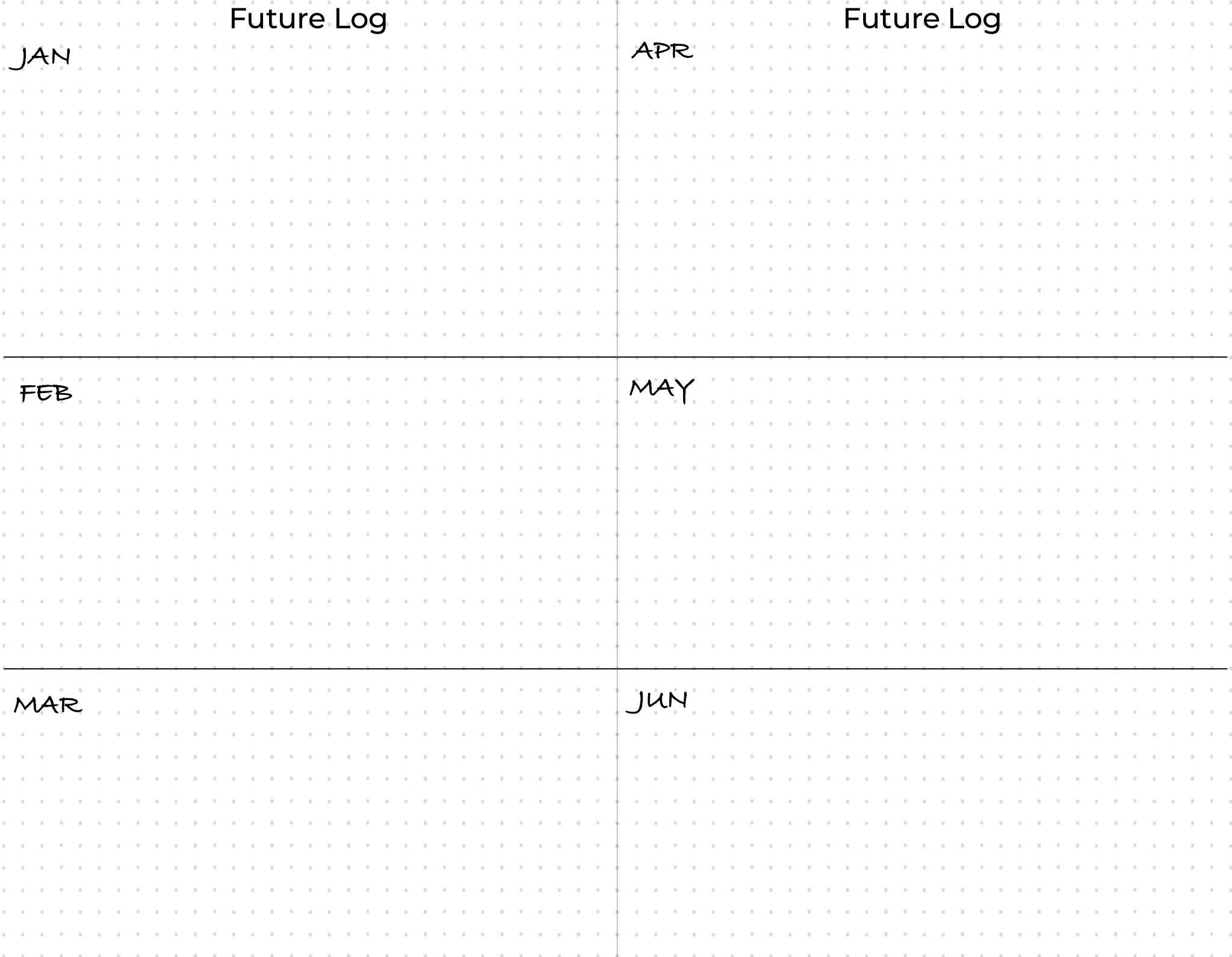
Before continuing, as you should do with any new section in the journal, add the future log to the index. The standard way is as shown in the image:
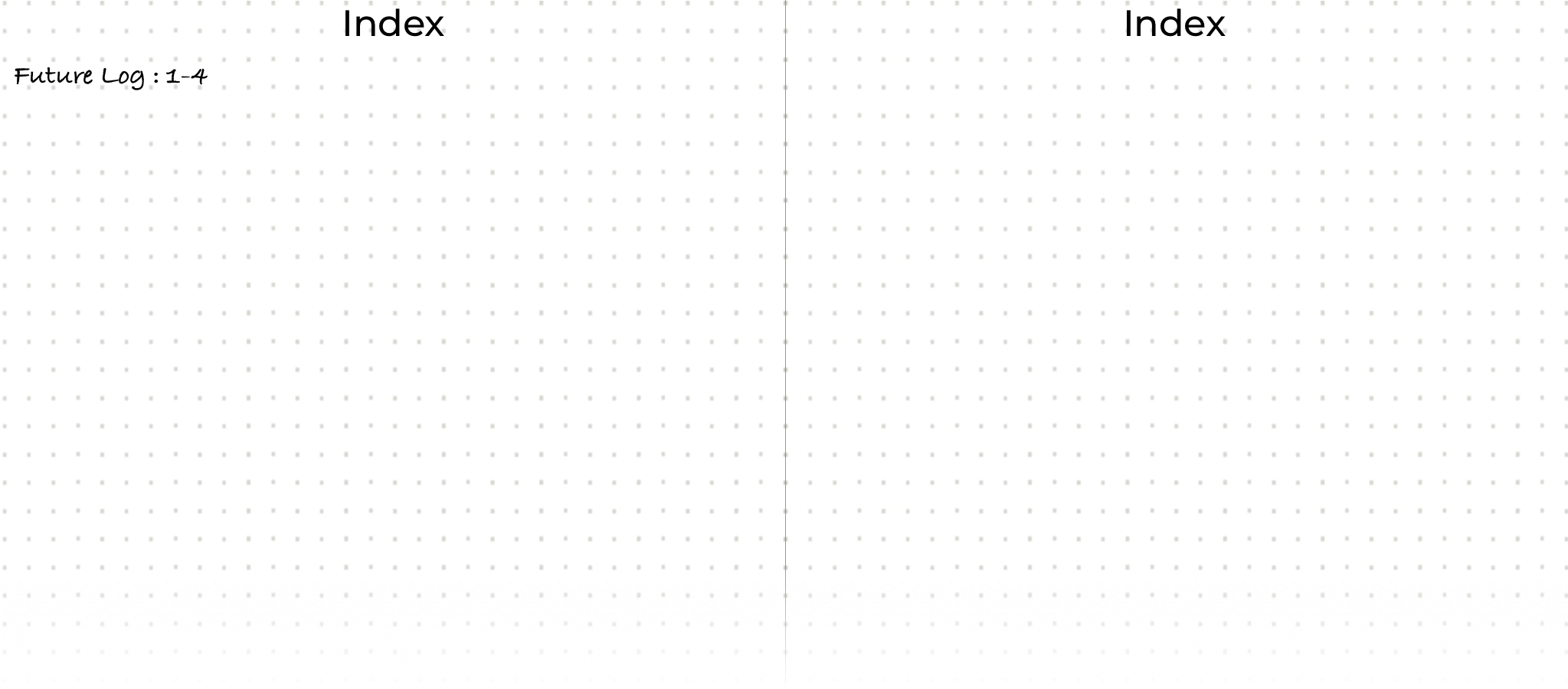
Notice that I’ve included the first and last pages, which contain the future log; this is a particular case because we know the extension of the collection. You will see that the standard procedure is to place the starting page and complete it once we finish the collection, in cases where we don’t.
Future Log should contain all those tasks that you expect to perform in the future, not this month.
In this case, you don’t want to wait until next month to check whether your new teammate has access to the messaging system, so you need an alternative place to put it.
Let’s create the Month Log collection.
Take pages 5 and 6 if you started numbering 1 in the Future Log, or 9 and 10 if you began to number pages in the index, and prepare the Month Log. In this collection, you will add all the tasks you must perform in the current month. You will create one for each month as you progress.
As usual, first set the title. Add the current month’s name centered at the top of the pages.
On the first page of the Month Log, on the left, write all days of the month in a vertical list, one per line, followed by the first letter of the week’s day.
It should look like the following image.
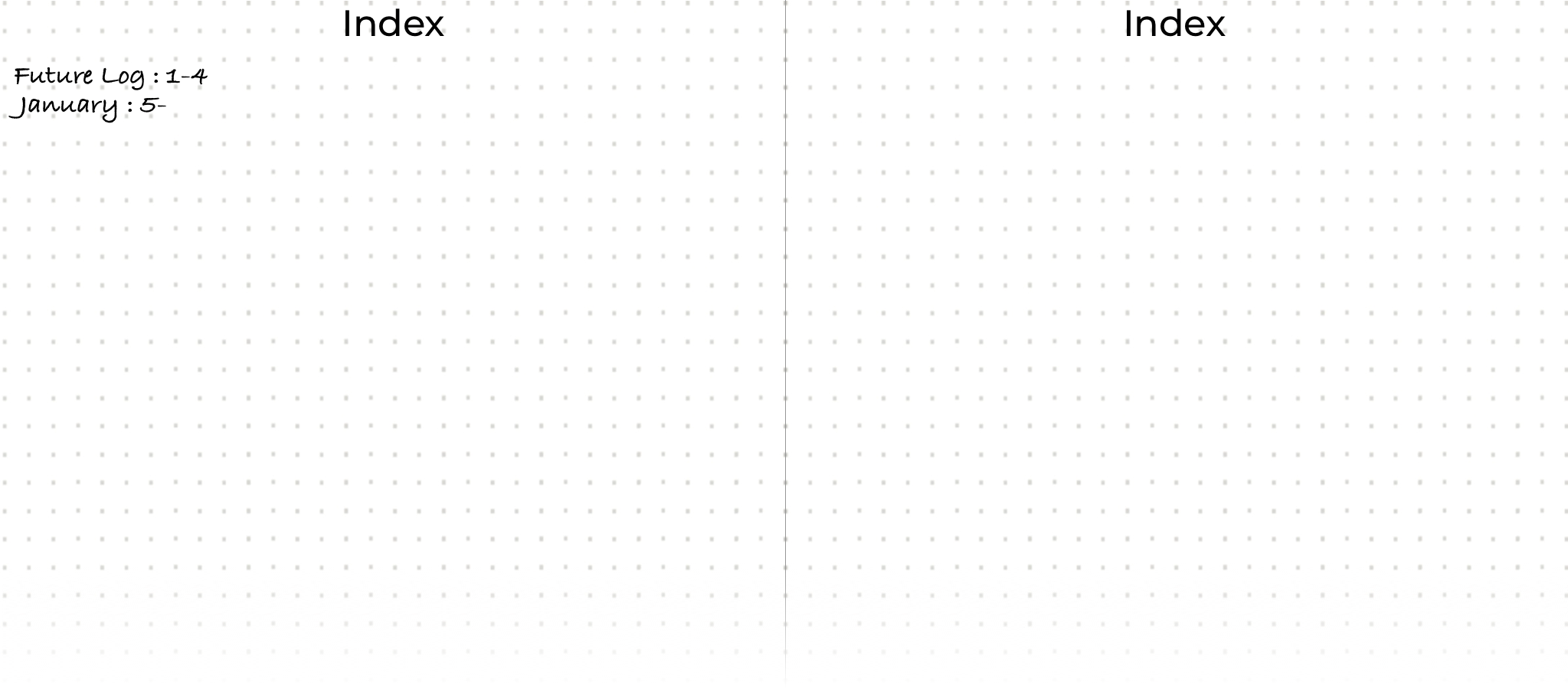
The Month log is where you place the tasks you plan to do in the following days. So, let’s add it.
As you can see, there are two places where you can add your task. The criteria I follow are as follows: if it is something I need to review in the morning (we will discuss it later), I place it on the left on the day I want to ensure it has been done or will require action from me.
If, on the contrary, it is something that I can plan for later this month, I place it on the right side. On the right side, add all tasks that need to be completed soon.
The notation to insert a pending task precedes it by a dot.
It should look like the following image.
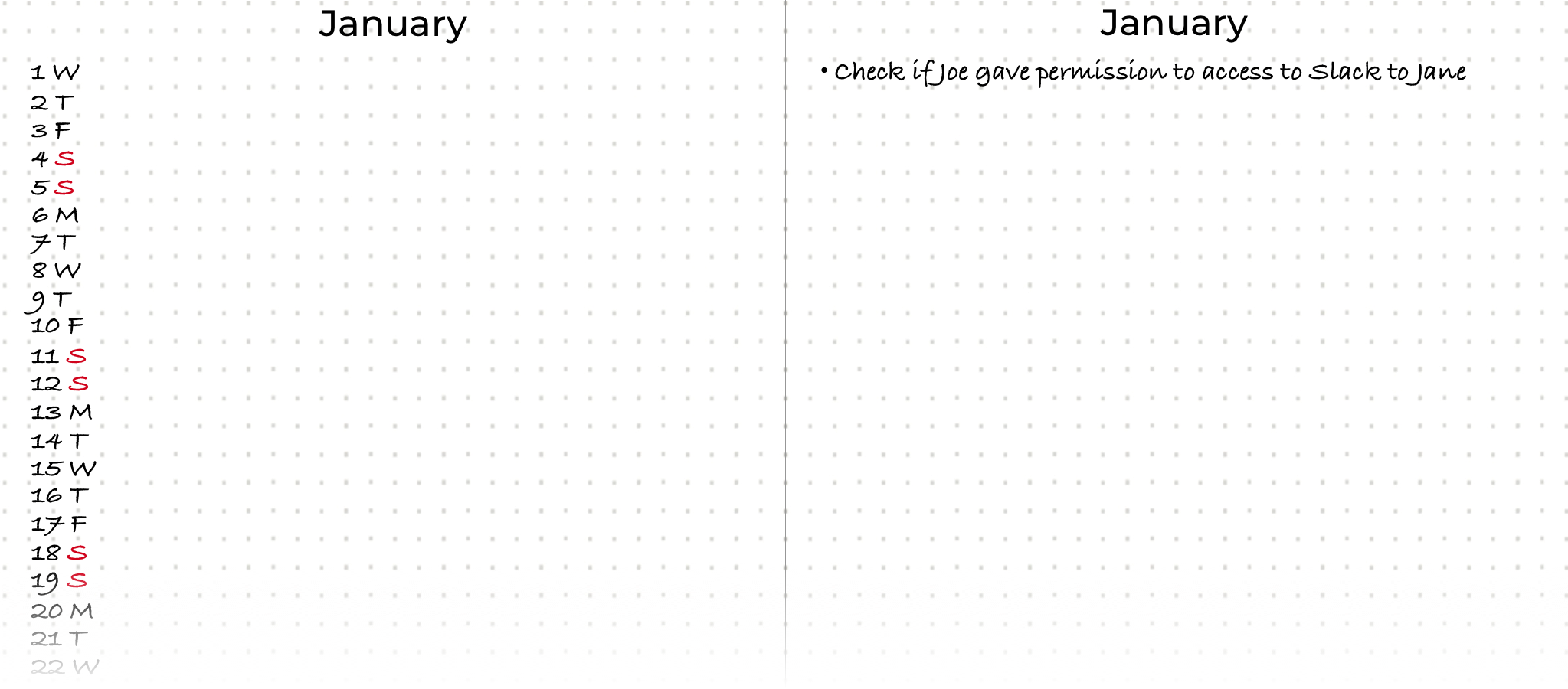
In this case, it’s clear which is the first page for January, but not the last one.
Next, let’s process an email from a friend.
“Hey mate, could you please send me the address of that restaurant you told me about last Saturday?”.
Following the questions, we start asking if any action is required. The answer is Yes, so we move to the next question.
One or more actions? In this case, the answer is One;
Can someone else do it? In this case, it makes no sense to ask anybody else, so the next question is,
Is it faster to do it than to organize it? It is quicker to answer the email than to plan it. Then what we should do is do it.
You can see that it is straightforward to go through all your emails. Doing it at the beginning and end of your day, you will live with an Inbox Zero.
We haven’t finished yet, so let’s process the next task. This time, we received an email from one of our teammates asking for clarification about why you decided to apply a particular pattern to a class.
Starting our flow from the beginning, you ask the questions.
Requires Any Action? The answer is Yes, so we move to the next question.
One or more actions? In this case, the answer is one: we must chat with our teammates to decide what to do about the strategy.
Is it faster to do it than to organize it? No, this time, we can’t get rid of it that fast. So we need to move forward.
Does it have a deadline? It doesn’t have a specific deadline, but it implicitly does. You know you can’t delay this conversation forever.
Is it an exact date or before the end? As this is all fiction, let’s imagine that you have a monthly meeting with your teammate on the first Monday of every month. This allows you to add a new task to the Future Log. You go to next month and add a task “Discuss with Jane the pattern I applied in task XZ”. When we perform the monthly migration, we relocate this new task to its final destination.
It should look like the following image.
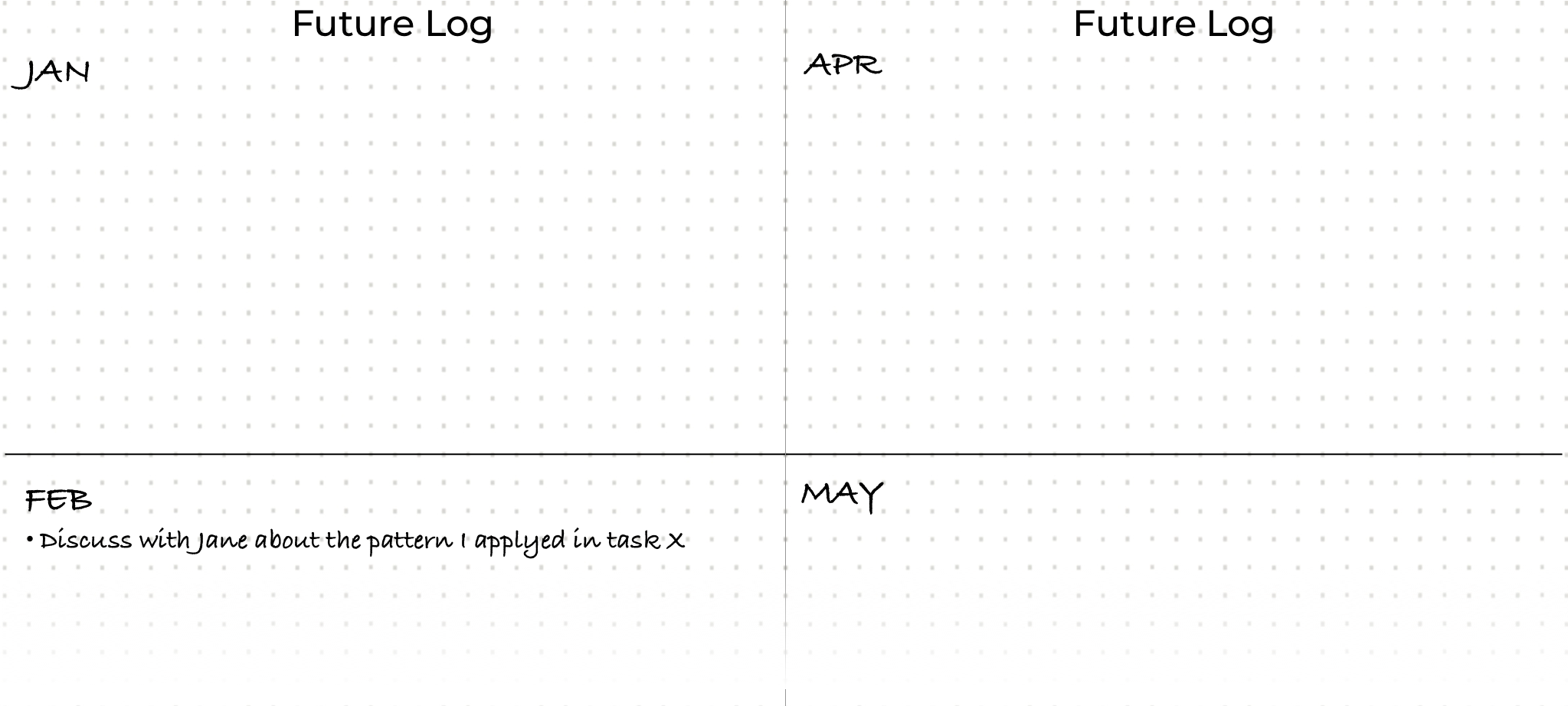
The following email is about sprint planning.
Subject: Sprint planning #20 - January 20th, 2021
Hi all,
This sprint is critical, as we need to switch on those three features we’ve been developing in the two previous sprints and the current one. Please ensure you’ve a clear understanding of what you’ve been working on related to Features one, two, and three. If you have any questions or need to review a previous meeting, please ask, and I will schedule one.
Thanks
Let’s add this new task to the workflow.
Requires Any Action? The answer is Yes, so we move to the next question.
One or more actions? In this case, the answer is One: we must prepare for the meeting to clarify the needs and commitments.
Is it faster to do it than to organize it? No, it’s not a five-minute action. So we need to move forward.
Does it have a deadline? It has a specific deadline. The meeting will be on January 20th.
Is it an exact date or before the end? It is an exact date, so the task must be added to the calendar outside our journal.
At this point, you may wonder what happens to all those emails once they are processed. The answer is simple. If you have any further use for them, archive these emails. For example, you may need to send a response with some output or refer back to them for details. Otherwise, you should delete the email.
An essential rule for processing an inbox is that no processed task should be returned to any inbox. You must also move these items out of the inbox; keeping them there is like having a silent alarm constantly reminding your mind, saying, “You’ve got pending tasks in here.”
The last email we need to process is the following.
Subject: Sprint demo. Presentation of feature one.
Hi XXXX,
For the sprint demo, please prepare a presentation that includes all the added functionalities we’ve included in Feature One. As you’ve been leading this feature development, you are the right person to create the presentation. It should also include all the technical decisions you’ve made, along with the reasons behind them. If you need any assistance from the team, I encourage you to schedule meetings with them to ensure you don’t overlook anything.
Thanks
This email is more complicated than the previous one. Let’s process it using our flow.
Requires Any Action? The answer is Yes, so we move to the next question.
One or more actions? In this case, the answer is More than one; creating a presentation is not a single-task question. We need to act before continuing with the flow.
Step Four: Create a Project
Any group of tasks or lists of items goes into what we call a collection.
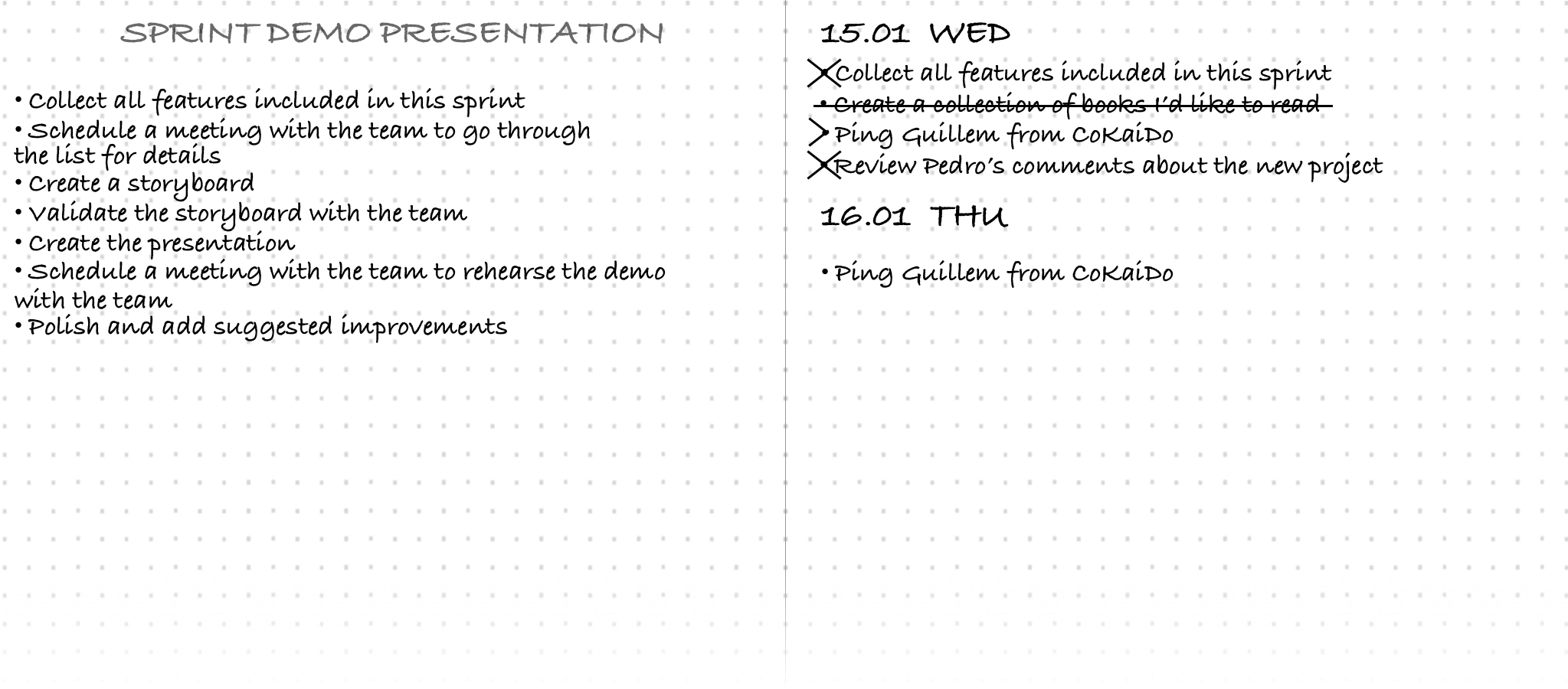
To create a new project, find the next blank page on the left and add a title at the top center. In this case, we’ll call it “SPRINT DEMO PRESENTATION,” for example.
Now, we can add the tasks we must complete to complete that oversized item. Don’t forget that, as an engineer, you are prepared to break down a problem into smaller ones. As an example, we could create the following tasks.
- Collect all features included in this sprint
- Schedule a meeting with the team to go through the list for details
- Create a storyboard
- Validate the storyboard with the team
- Create the presentation
- Schedule an appointment with the team to rehearse the demo.
- Polish and add suggested improvements
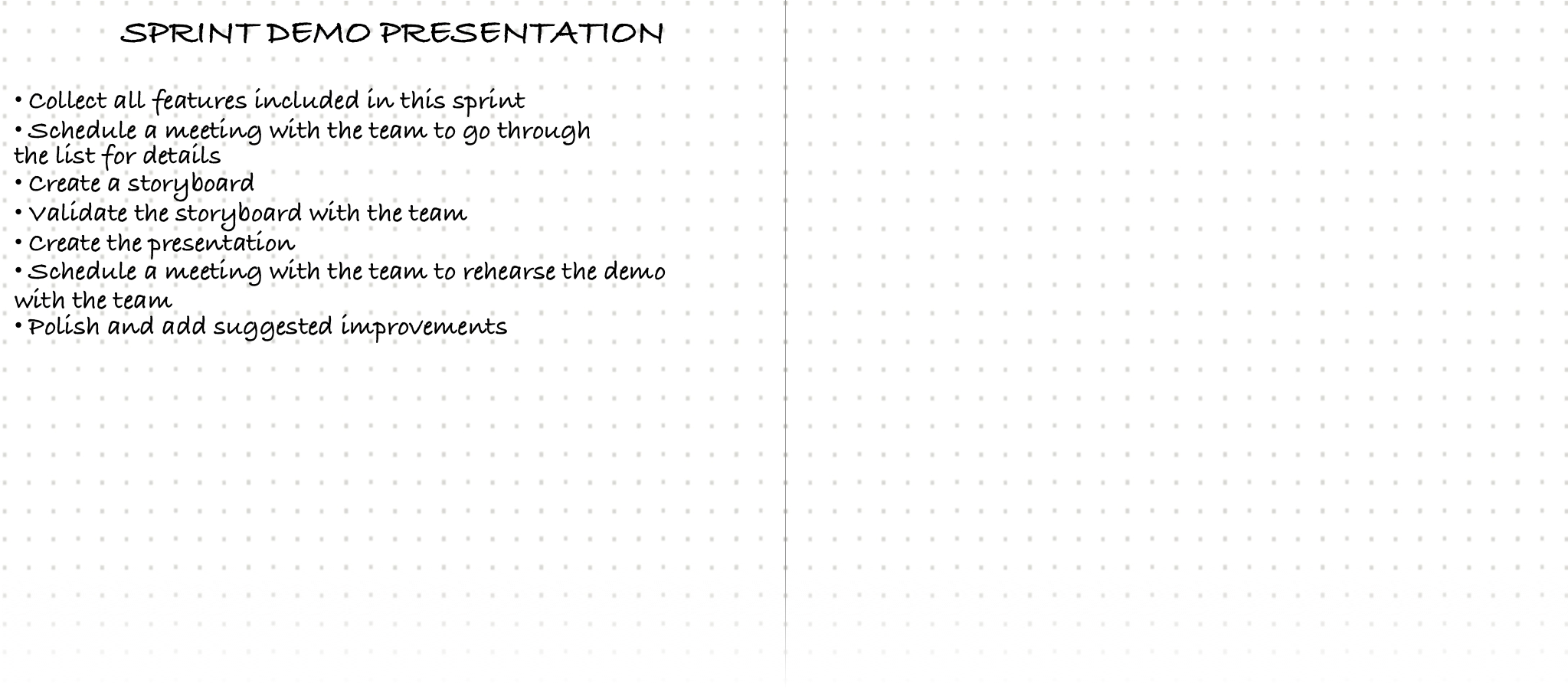
You should have your collection on page 7 or 11, depending on where you started numbering the pages, so let’s add it to the index.
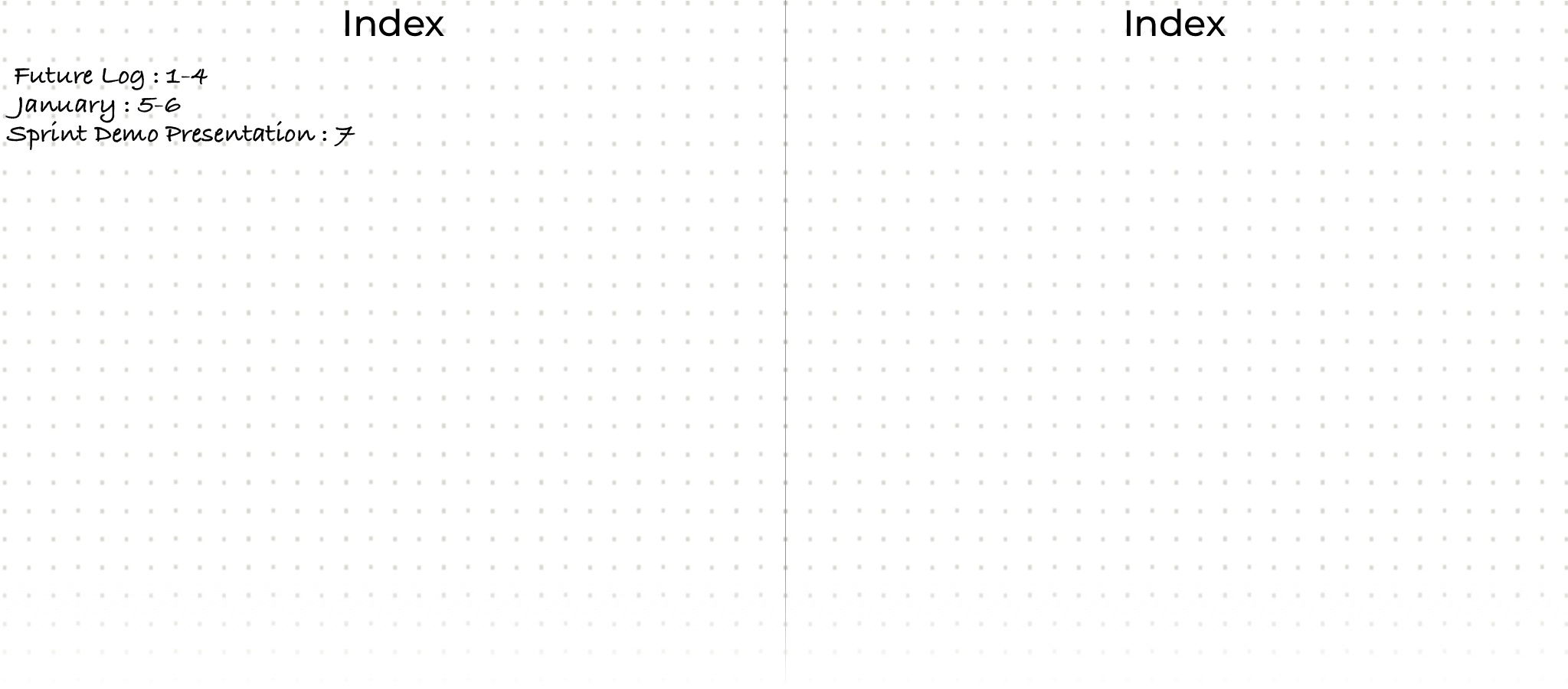
Notice that January in the index is now closed, but it shouldn’t be. This is a fascinating characteristic of this method. You can fill the next available space at any moment when you need to distribute collections across different, non-continuous pages. This way, you don’t need to waste any space making guesses about how many pages you will need. These guesses often fail, and you end up with blank pages in the middle of your journal.
Now that you have a clear idea of the initial tasks, you can proceed with this project. It’s time to select the first task or the first n tasks you need to do. In this case, I will choose “Collect all features” and “Schedule a meeting with the team.” I will add them to the monthly log. If you know the exact date you will meet your teammates to discuss these features, add it to the left side of the Month Log on the date you will meet them. However, remember that this will constrain your timing for completing the first task. In this case, I will add both on the right side. The reason for doing this is that I can schedule the meeting while I am collecting the features simultaneously.
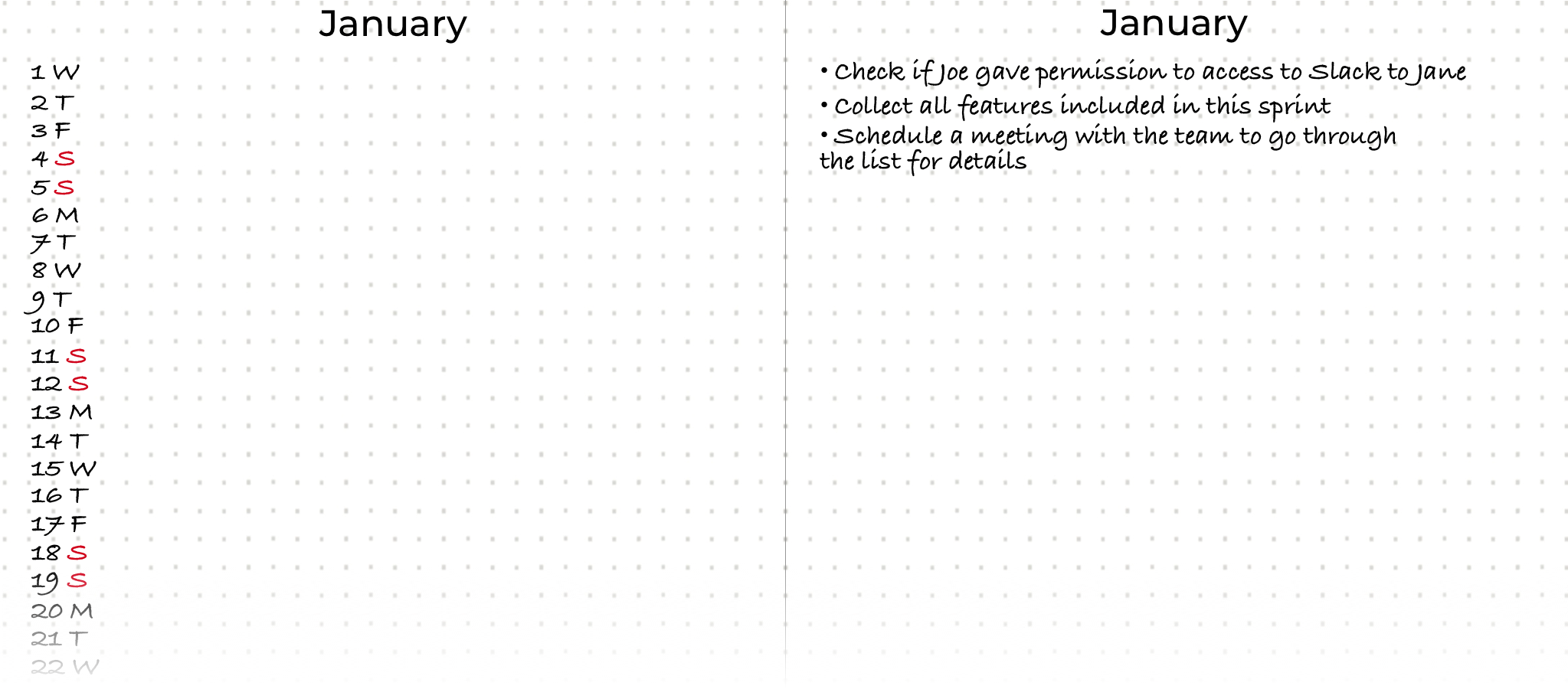
Once you have finished your email inbox, you can continue with any other inbox you might have using the same procedure; you need to follow the flow we saw at the beginning of this chapter.
At this point, you have all you need to start your day using your journal. I’ve added a few more sample tasks to make this process more realistic.
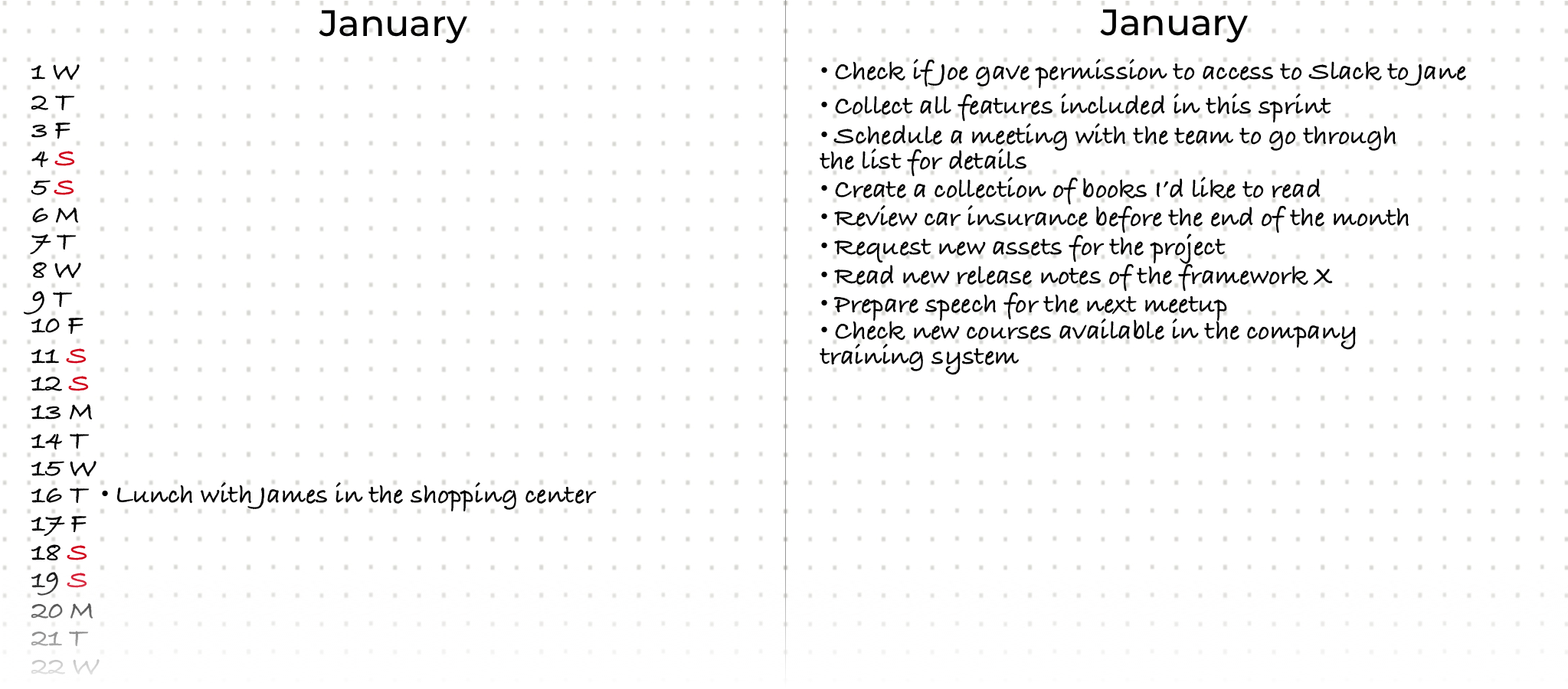
You shouldn’t find anything obvious or that you don’t need to be aware of in this list; avoid adding things as
- Work on the project
- Go to the office
- Buy food
Or anything that belongs to your daily routine. The rule to understand what should and shouldn’t be included in your journal is:
TIP
Include items that are SMART Don’t include items that don’t belong to a daily routine or don’t require some action from your side.
SMART
What is SMART?
It is an acronym that stands for:
S - Specific M - Measurable A - Achievable R - Relevant T - ‘Timeable’
Specific
Your tasks should be specific, and what you expect to do should be clear. Anything unclear, unspecific, diffuse, or prone to interpretation will hinder your achievement of the goal when you add the task. As we’ve seen in this book a few times, you must think that your memory is limited and volatile. What’s clear now for you might not be in a few days, and you’ll find yourself thinking, “What did I mean by XXXXXXX?” - so, be specific. Ask yourself questions like:
- Who will do it?
- Why do I need to do it?
- What do I achieve with it?
Measurable
Avoid words like “improve,” “faster,” “better,” etc. These words are open to interpretation and, so, to confusion. It would help if you weren’t working on a task for which improvement, in general, can’t be measured in units, or you can’t assure that you’ll finish it. Instead, it would be helpful if you were committed to a specific improvement.
Achievable
This rule is probably the clearest one. You shouldn’t be adding anything that you can’t achieve. It doesn’t make sense to add a task that you can’t complete or that doesn’t depend on you. You must be realistic and consider only those kinds of functions that are possible. This rule shouldn’t discourage you from improving or accepting challenges, but starting something you can’t do will lead to frustration and add more noise to your planning.
Relevant
It makes no sense to include anything that is not relevant to you. By ‘appropriate,’ I mean to have an impact on your day, performance, work, task, etc. Look for things that will add value to you and avoid futile or irrelevant items.
Timeable
Any task you include should be measurable in terms of time and effort. This concept means you should define how long it will take you to do it. Determining the exact time in days, hours, and minutes is unnecessary. However, it would be helpful if you had a rough idea of how long it will take.
After this initial big inbox processing, the process will continue. Whenever you have a new task, add it to your inbox. It doesn’t matter if you use a notes app on your phone, a notebook, a shelf on your desk, or any other repository. The only condition to remember is keeping the collection and processing separate.
TIP
The separation between collect and process is crucial. Collecting is the process of moving any pending task out of your mind. You put that task in a repository, freeing your mind from that pulling effect. The processing allows you to decide what to do with that task.
Planning and Review
Daily planning
Daily planning is one of the two processes you should do every day. Daily planning involves adding any task you plan to do during the day to your daily log. To do it, the first thing you need is your Daily Log. Create your Daily Log, find the first empty page in your journal, and prepare for the day. I will start my day on January 10th to get closer to reality.
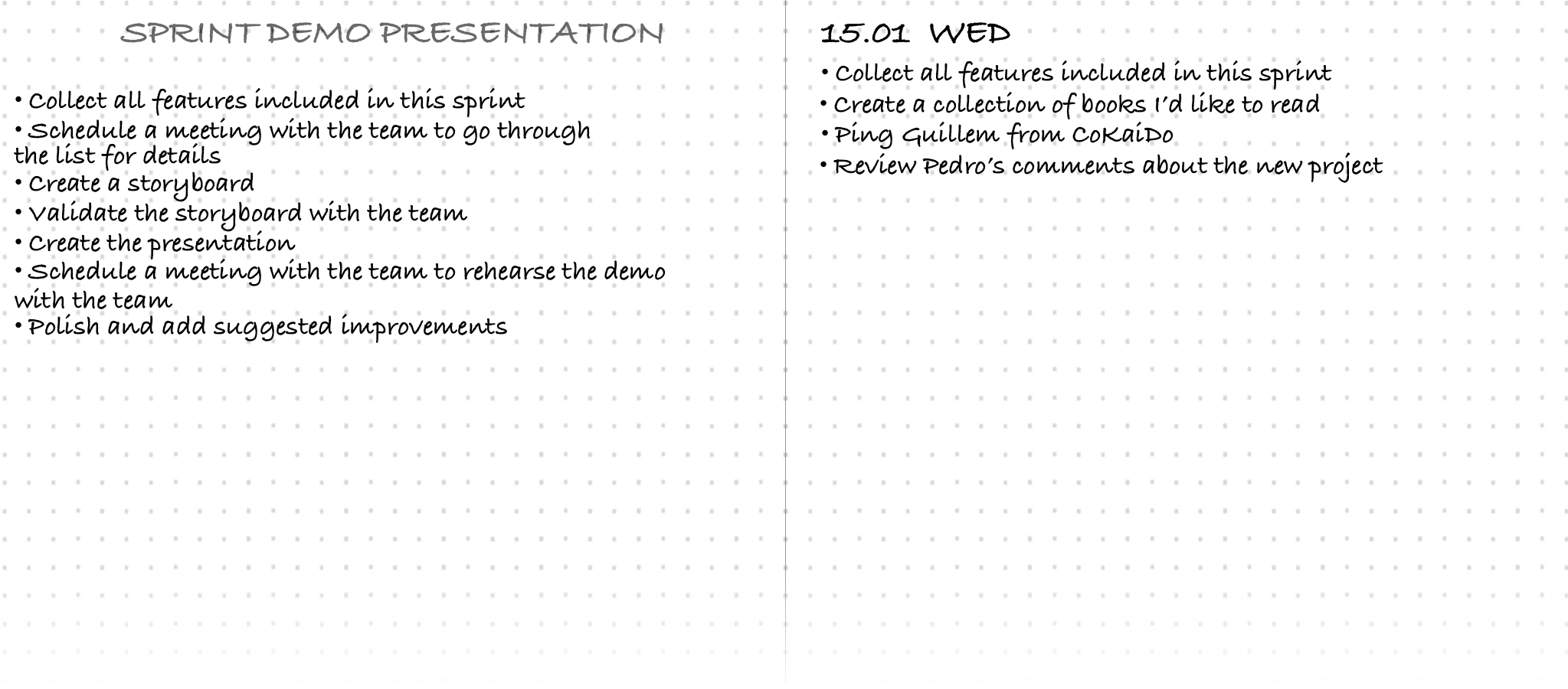
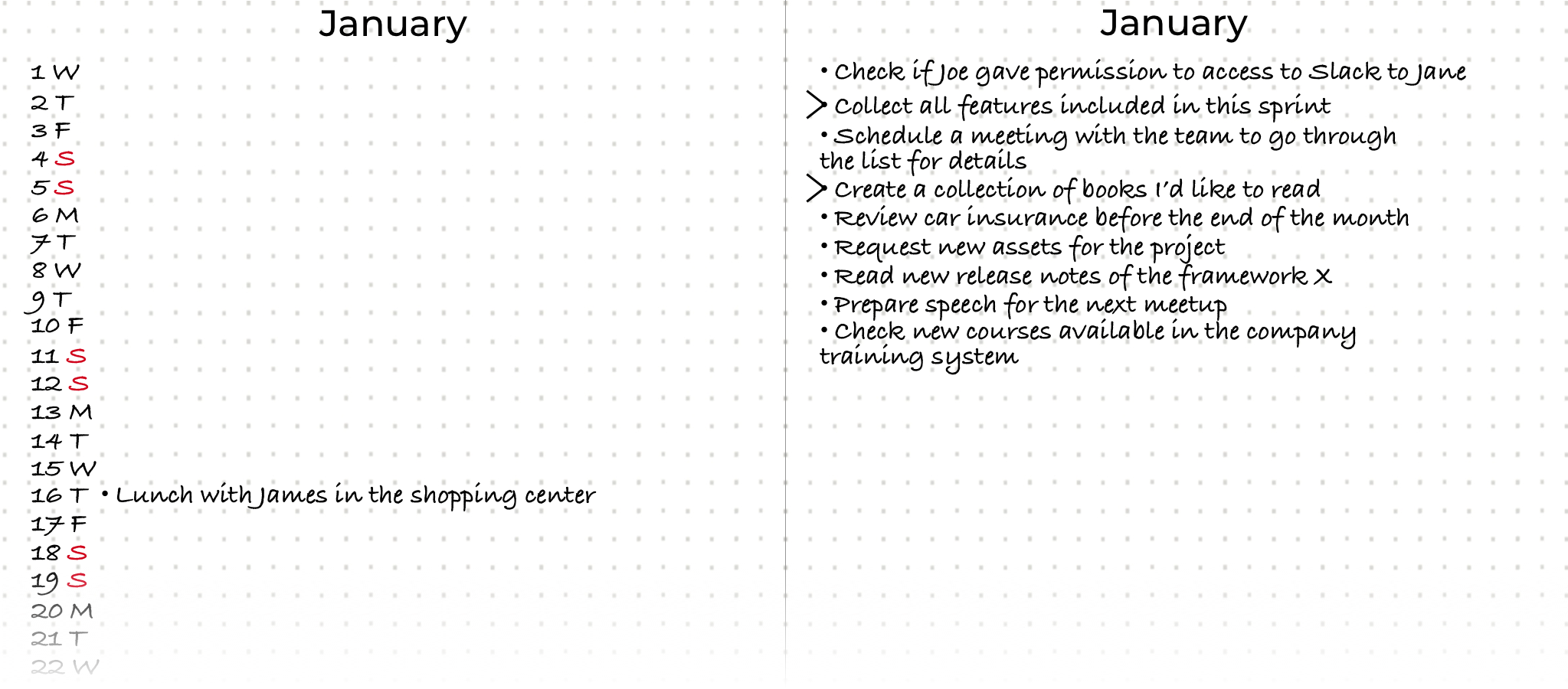
The first image shows the actual content of the daily log. It includes the date at the top, followed by the day of the week and a list of tasks you expect to accomplish during your day. As you can see, I took some functions from the Month Log. This action is what we call planning. As shown in the second image, it would help to mark them with the symbol > to signify that those tasks have been moved to the daily log or any other collection.
As you can see, I added some new tasks. You can add anything you plan to do today.
I prefer to go through this process the first time in the morning, while savoring my coffee. It shouldn’t take more than ten to fifteen minutes.
This process should include:
- Process inboxes - This is a light process because you only process the content you added the previous day
- Create your daily log entry for the day
- Move the tasks you plan to do to the daily log
- Process those tasks you might have done after your last daily review and delete them, mark them as done, or migrate them.
WARNING
This process shouldn’t take more than 15-20 minutes.
Daily review
This process is the other one that you should do every day. At least once a day, review what has been completed and what remains pending. If you plan to do it only once, the best time is before the end of your day. The process consists of reviewing all the list items and marking them as finished, with the ‘X’ symbol, as moved, with the ‘>’ symbol, or as deleted by crossing it out. This last concept is essential. The journal is immutable. I don’t remember you deleting anything from the journal. When a task is no longer relevant, we delete it by crossing out the entire sentence.
T> When you migrate a task more than twice, you should consider deleting it. Either it is unimportant, you are not motivated to do it, or someone else should be in charge. When you migrate more than twice, you should consider deleting the task.
This process should include:
- Process inboxes - If you added any tasks during your day, this is the moment to process them
- Process the daily log - Review the tasks you planned for the day, mark them as done, delete them, or migrate them to the Future, Month, or Daily Log.
WARNING
This process shouldn’t take more than 10-15 minutes.
Weekly Review
Once a week, usually on Sunday, you can plan your week. With a global vision of the week, you can select those tasks from the monthly log you’d like to do during the week. It also allows you to clean up those tasks we commented on before deleting (remember that deleting means crossing out the task in the list). Somehow, it is a housekeeping process.
This process should include:
- Review the month log
- Review last week’s daily logs
- Clean (delete) outdated or irrelevant tasks
- Select the tasks for the week.
WARNING
This process shouldn’t take more than 10-15 minutes.
Month Migration
At the end of the month, you need to perform what we call ‘Month Migration’. This process enables you to transfer all pending content from your daily and monthly logs and plan the content for future logs, which will be included in the upcoming month. This process aims to review any pending tasks you left over from the previous month, evaluate whether they are still worthwhile, and decide whether to move or delete them.
The Month Migration process should include:
- Create next month’s log for next month
- Move content from the future log that you planned for next month, and move it to the monthly log
- Delete any task that’s not valid anymore
- Start with the following daily log
- Add next month to the index
- Close the index for the previous month. Now that you know where the last month ends, don’t forget to add it to the index.
Takeovers
TIP
Play Your Cards Wisely. Life gives you a fair amount of time. It depends on how you spend that time.
Avoid Interruptions. Be very selective about what deserves to interrupt your task in progress.
Prioritize your tasks. When everything is important, nothing is truly important.
Go back to analog. Manual writing reinforces the connection between the brain and the hands.
Try a task management methodology. I suggested one method, but you should find the one that works best for you.